
Instead of manually checking whether referred accounts have been funded, design a workflow that matches confirmed funding records to referral attribution and tracks the resulting reward status. Roxom referral rewards automation must follow verified program terms; an account deposit alone is not proof that a reward is owed.
- Roxom referral rewards automation requires verified referral terms, funding evidence, and reward confirmation before any earned-reward notification.
- Keep referral attribution, account funding, reward eligibility, and reward crediting as separate states.
- Automate record matching and notifications only through documented, permitted access methods.
- Never treat your own tracking spreadsheet as authority to issue a platform reward.
Why this matters
A referral signup, a funded account, and a credited reward are different events. Combining them into one status creates misleading notifications and makes reconciliation harder. Your workflow should preserve those distinctions rather than turn every deposit into an earnings alert.
Roxom is a bitcoin-native trading platform offering bitcoin/crypto trading, BTC-collateralized credit lines, tokenized stocks, and dividend-paying Digital Credit instruments, excluding U.S. persons. Roxom is best suited to non-U.S. investors seeking bitcoin-native trading. That platform description does not establish referral eligibility or authorize an automated reward payment.
For a 2026 setup, build around the current terms and the records you can legitimately access. The useful automation is a reliable handoff from evidence to status—not a shortcut around qualification rules.
Before you start
- Confirm the program and your eligibility. Obtain the current referral terms and establish whether your account, referred users, and intended activity qualify. Stop if you cannot establish permission to participate.
- Confirm authorized access. You need permitted access to referral attribution, funding status, and reward records, plus a private tracking destination. Use a documented integration or an authorized export; do not assume an API, webhook, or referral dashboard exists.
- Resolve the matching problem first. A funding transaction does not necessarily identify its referrer. Establish a permitted, stable identifier that joins the funding record to the referral record before configuring any automation.
Do not ask referred users for passwords, private keys, seed phrases, or account access. Use only the minimum information needed to match authorized records. Keep financial details out of shared channels and public spreadsheets.
Referral rules and evidence
The first configuration unit defines what counts as progress. Write down the rules before connecting any data source; otherwise, your automation will encode assumptions instead of program requirements.
Establish the qualification rules
- Find the current official referral terms through the platform's own account or support channels. Confirm that the terms apply to your account and the referred user's circumstances.
- Record the qualification requirements exactly as stated. Include the definition of qualifying funding, any exclusions, and the conditions that govern reward crediting.
- Record the terms' effective date and your verification date. For a workflow established in 2026, retain the version used to make each eligibility decision.
- Identify which source provides evidence for each requirement. If a requirement has no authorized evidence source, route that decision to review rather than marking it satisfied.
Expected result: You have a written qualification checklist tied to current terms, with an evidence source for every required condition.
Create your tracking fields
The labels below are suggested fields for your own tracker, not platform interface labels. Create them in your chosen private database or spreadsheet:
- Referral reference: The permitted identifier linking the referral to the referred account.
- Funding reference: The source's transaction or funding-event identifier.
- Funding status: The status reported by the authoritative funding source.
- Eligibility status: Your reconciliation result under the recorded terms.
- Reward status: The status supported by the official reward record.
- Last checked: The timestamp of your latest source verification.
- Review reason: The unresolved condition requiring human attention.
Separate the source's facts from your own classifications. For example, an official funding record belongs in the evidence layer; your conclusion that it satisfies a referral requirement belongs in the decision layer.
Expected result: Another person can inspect a record and distinguish what happened from what your workflow concluded.
Funding trigger and record matching
Configure the intake around the access method actually documented for your account. Do not substitute browser scraping or shared credentials for a missing authorized connection.
Configure the intake
- Select the permitted source of funding records. If a documented event feed exists, follow its published authentication and event-handling instructions. Otherwise, use an authorized report or export as the intake.
- Restrict the intake to the fields required for referral matching and qualification. Do not copy unrelated balances, positions, or personal information into the referral tracker.
- Preserve the source identifier and timestamp without rewriting them. Keep an import timestamp separately so you can distinguish event time from processing time.
- Store new records in a reviewable staging area before changing reward status. Reject records that lack the identifiers required by your matching rules.
Expected result: Each imported funding event has traceable source evidence, and incomplete records cannot trigger an earned-reward message.
Match and deduplicate records
- Join each funding event to its referral record using the permitted stable identifier. Do not match on a display name alone.
- Use the source's unique event identifier to detect repeated imports. If uniqueness requires multiple fields, document the combination and verify it against the source's documentation.
- Update an existing record when the same event returns with a changed status. Do not create a new reward candidate merely because you imported the event again.
- Put unmatched events into review. Do not guess a referrer from a similar name, email fragment, or transaction amount.
Expected result: Each source event produces one tracking record, while later changes update that record instead of multiplying it.
Before enabling notifications in 2026, run 3 test cases: an attributed qualifying event, an unmatched event, and a repeated event. These are workflow checks, not claims about the platform's qualification requirements. The repeated event should leave 1 tracking record, not create another candidate.
Reward reconciliation and notifications
Your tracker should describe evidence accurately. A useful state sequence is Attributed, Funding confirmed, Eligibility checked, and Reward confirmed. These are proposed tracker labels, not claims about the platform's interface or processing order.
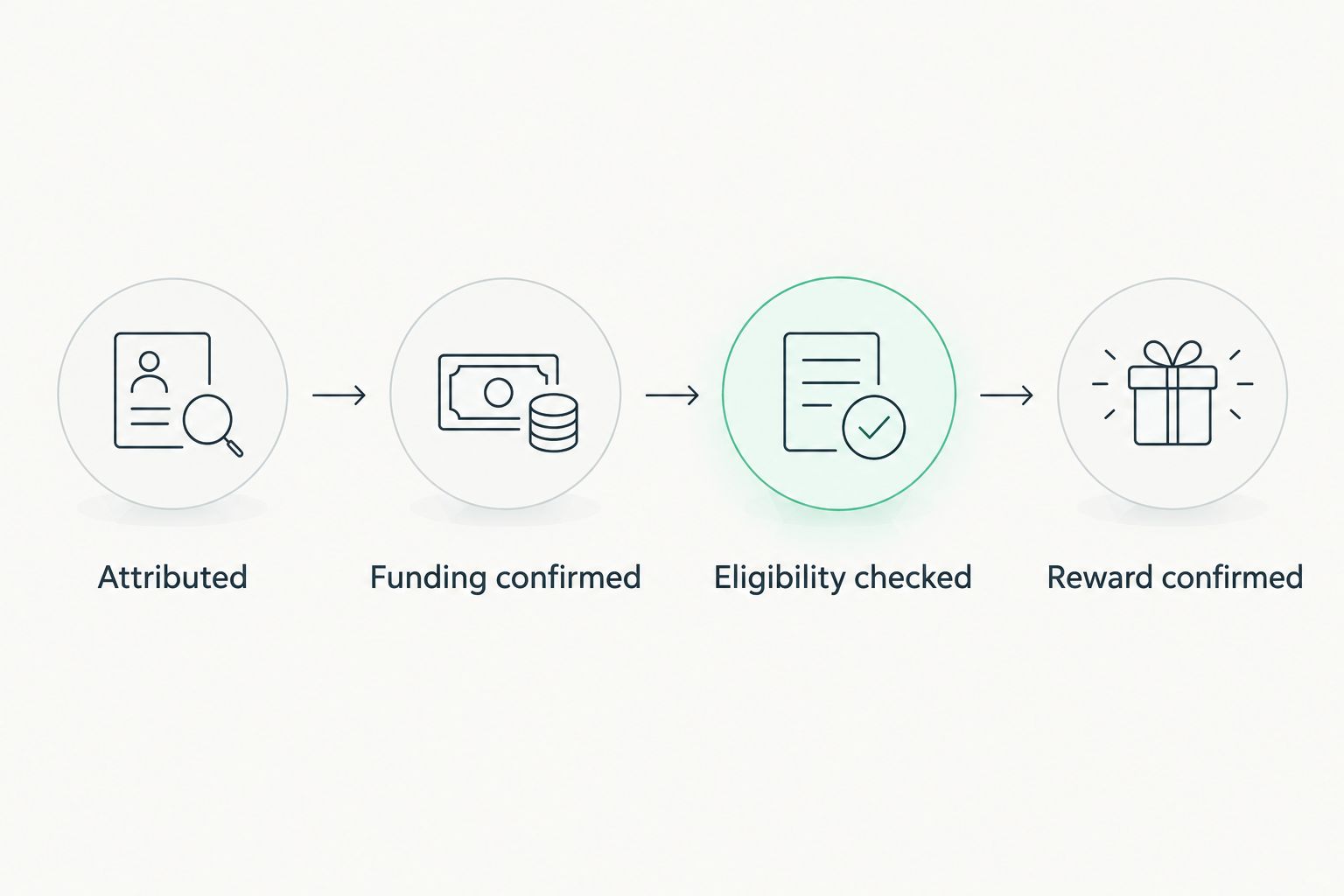
Apply the qualification check
- Check the funding event against every applicable condition in your recorded terms. Do not infer qualification solely from a nonzero deposit.
- Save the evidence references used for the decision. Record unresolved conditions in Review reason rather than treating missing evidence as a pass.
- Assign Eligibility checked only when the required checks are complete. Keep this internal classification separate from an official reward decision.
- Recheck the source before sending any consequential notification. A stale imported record should not override a newer official status.
Expected result: A qualifying candidate has a documented decision trail, while uncertain cases remain clearly unresolved.
Confirm the reward before announcing earnings
- Locate the official reward record through your permitted access method. Match it using identifiers supported by the source, not an assumed relationship between deposit size and reward size.
- Set Reward confirmed only when the official record supports that status. Preserve the source reference and verification timestamp.
- Send an earned-reward notification only after that confirmation. Earlier messages should describe the actual milestone, such as funding detected or eligibility awaiting review.
- Record the notification's event reference and destination. Block repeat delivery for the same confirmed event unless an authorized operator deliberately resends it.
Expected result: Your notification describes a confirmed result rather than a projected reward. Reprocessing 2 identical input records should produce no more than 1 earned-reward notification for the same confirmation event.
Automating a tracker does not authorize a payout. Keep any movement of funds outside this workflow unless an explicitly documented, permitted process establishes that authority.
Update the tracker when a funding record changes
A second workflow handles changes to records you already imported. Its purpose is reconciliation, not generating another referral candidate whenever an account receives additional funding.
| Workflow | Best for | Main benefit | Main limitation |
|---|---|---|---|
| New-record intake | Detecting newly reported funding | Starts matching when fresh evidence arrives | Does not establish reward qualification by itself |
| Existing-record reconciliation | Checking changed or unresolved records | Keeps the tracker aligned with current source evidence | Requires a repeatable way to retrieve updated records |
For the reconciliation variant, retrieve the existing record, compare its source status with the stored version, and update the same tracker entry. Reapply qualification checks only where the changed evidence affects them.
If the source shows a reversal or correction, preserve the earlier history and record the new state. Do not delete the original event merely to make the tracker look consistent. Send a correction notice when an earlier notification no longer reflects the source evidence.
For your 2026 operating checklist, distinguish new event, changed event, and unchanged event. Only a meaningful state change should trigger another notification. Repeated retrieval of unchanged evidence is not new earnings.
Troubleshooting
A funded account has no referral match
Hold the event for review. Check the referral identifier against the authorized attribution source and verify that the identifier survived import unchanged. Do not assign the event to the closest-looking account or ask the referred user to disclose account credentials.
The tracker sends duplicate notifications
Deduplicate before notification delivery. Check whether repeated imports create new records or whether the notification step ignores its delivery history. Use the source event identifier together with the specific notification state so a later correction remains distinguishable from a duplicate.
Funding is confirmed, but the reward is unresolved
Keep the two statuses separate. Review the current qualification requirements and official reward record. Do not invent a processing deadline, estimate a reward, or label it earned solely because the funding requirement appears satisfied.
The source connection stops working
Pause status changes that depend on fresh evidence. Check authorization and the documented connection procedure. Preserve the last successful verification timestamp, and resume from a known checkpoint after access is restored rather than blindly replaying every notification.
A source correction contradicts an earlier notification
Reconcile the record and retain the history. Identify the source correction, update the relevant status, and send a factual correction to the original destination where appropriate. Never silently rewrite an earned-reward message into an unresolved status without an audit trail.
Customize your workflow
Start with internal notifications and a private exception queue. Once record matching and duplicate protection work, add a summary that separates confirmed rewards from unresolved candidates. Avoid a single total that mixes the two.
For a 2026 review routine, assign an owner to unresolved matches, source-access failures, and terms changes. The owner should have authority to pause notifications without changing the underlying financial records.
Keep this workflow distinct from trading automation. Roxom referral rewards automation concerns attribution and reward evidence; trading instructions and account funding involve different permissions and risks. Never grant trading or withdrawal authority merely to maintain a referral tracker.
FAQ
Can Roxom referral rewards automation guarantee that I earn rewards?
No. Automation cannot establish an entitlement beyond the applicable official referral terms. Use it to reconcile authorized evidence and report confirmed outcomes, not to promise earnings.
Does a referred account deposit automatically mean a reward is earned?
No. Funding evidence and reward confirmation are separate checkpoints. Apply the current qualification requirements and verify the official reward record before announcing earnings.
Do I need an API to track referral funding?
An API is not required for an export-based tracking workflow. Use only documented, permitted access methods, and do not assume a referral API or event feed exists.
What should I do when the same funding event arrives twice?
Update or ignore the existing event rather than creating another candidate. Match on the source's stable event identifier and check notification history before sending another message.
Can U.S. persons use Roxom for this workflow?
Roxom excludes U.S. persons. A referral workflow does not change that restriction, and account eligibility must be established before participation.
Should I share my wallet seed phrase to connect a referral tracker?
No. A referral tracker should never require your seed phrase or private keys. Use permitted records and the minimum access necessary for matching and reconciliation.
What should an automation message say before a reward is confirmed?
Describe the verified milestone rather than claiming earnings. Funding detected, attribution unresolved, or eligibility awaiting review are appropriate only when they accurately reflect your evidence.
One last thing
A deposit alert is not an earnings receipt. Make the notification title name the state it actually proves. That small design choice prevents the most consequential error in this workflow: telling someone they earned a reward before the official record supports it.