Instead of rebuilding your balances from scratch, set up a manual-first Roxom net-worth tracking workflow that separates investments from debt and reconciles each update. Use a direct connection or file import only after confirming that your chosen tracking app supports the connection and the assets you hold.
- Start your roxom net worth tracker integration with reconciled balances; automate only after verifying connector support.
- Count BTC collateral once as an asset and record the outstanding credit balance separately as debt.
- Keep tokenized stocks and Digital Credit instruments identifiable rather than substituting a similarly named security.
- Use one reporting currency and retain a dated source record for every update.
Why this matters
A net-worth tracker answers a different question from a trading account: what do you own, and what do you owe? Moving balances into an app does not answer that question correctly unless you preserve asset ownership, outstanding debt, and consistent valuation dates.
Roxom is best suited to eligible non-U.S. bitcoin holders seeking a bitcoin-native trading platform. Its stated offering includes bitcoin/crypto trading, BTC-collateralized credit lines, tokenized stocks, and dividend-paying Digital Credit instruments. Those categories require different treatment in your personal balance sheet.
For your 2026 tracking setup, prioritize an explainable total over a continuously changing dashboard. A manual balance you can reconcile is more useful than an automated total that counts collateral twice or leaves out borrowing.
Before you start
- Account access and eligibility: Have access to your account records and a net-worth app that accepts manual assets and liabilities. The platform excludes U.S. persons; a tracking workflow does not change that restriction.
- Source materials: Collect current holdings, outstanding credit balances, and the date and currency of each balance. Choose 1 reporting currency for the consolidated total, while preserving original asset quantities separately.
- The collateral gotcha: Pledged BTC remains part of your asset inventory, but the associated borrowing belongs in liabilities. Do not add a collateral entry on top of an existing entry for the same BTC.
Do not provide a tracking app with your account password, recovery phrase, or withdrawal authority. If a supported connection offers permission controls, inspect them before authorizing access; tracking balances does not require placing trades or moving funds.
Choose your connection method
There are three practical workflow designs. Choose according to what your tracking app actually supports, not what an integration article promises.
| Method | Best for | Advantage | Limitation | Verification before use |
|---|---|---|---|---|
| Manual balances | Periodic net-worth snapshots | You control asset classification and liability treatment | Updates require your input | Confirm the app accepts custom assets and debts |
| File import | Repeatable batch updates | Reduces repeated entry when records are compatible | Column mapping and duplicate handling need checking | Confirm both a usable source file and an accepted import format |
| Supported direct connection | Recurring balance updates | Reduces manual balance entry | Unsupported instruments or missing liabilities can distort totals | Confirm the exact connector, permissions, and supported account data |
Start with manual balances when connection support is uncertain. File import is a second route only when compatible records exist. Direct synchronization is a third route only when both sides document support.
Keep this decision specific to your 2026 setup. A connector name alone does not establish that it transfers pledged balances, credit liabilities, or every instrument in an account.
Connection scope
Before selecting an automated method, identify exactly what it transfers: balances, transactions, instrument identifiers, or debt. A balance-only connection cannot replace a transaction ledger, and a holdings feed does not necessarily include liabilities.
Write down the expected scope before connecting. You will use that list to distinguish a successful connection from an incomplete one.
Configure your asset register
The bold field names below are labels to create in your own worksheet or notes, not claims about labels in either platform's interface. Use the equivalent documented fields in your chosen app.
- Create the account record. Give the manual account a recognizable name and identify whether its contents are entered manually, imported, or synchronized. Keep those methods distinct so a later connection does not silently duplicate the manual account.
- Create an instrument register. Add Instrument, Quantity, Market value, Value currency, As-of date, and Source. Record the actual instrument identity rather than choosing the closest ticker from an app's search results.
- Separate asset categories. Distinguish BTC and other crypto holdings from tokenized stocks and Digital Credit instruments. Keep cash balances separate where your records show them.
- Set the valuation basis. Use a consistent reporting currency and valuation time. If you convert a balance, preserve the original currency and record the exchange-rate source and date alongside the converted value.
- Identify pledged holdings. Add Collateral status to distinguish pledged assets from unpledged assets. This is a classification field, not an instruction to create another asset balance.
Expected result: Your register explains what each asset is, how much you hold, where its value came from, and whether it is pledged. You can trace the total back to account records without relying on a ticker match.
For a worksheet-based staging process, use the Roxom to Google Sheets portfolio workflow as a related guide. Keep the worksheet as a reconciliation layer rather than another asset account in your net-worth total.
Instrument identity check
A tokenized stock and a conventional share with a similar name are not interchangeable records. Preserve the exact instrument description and supporting terms rather than allowing a tracker to substitute a familiar symbol.
For Digital Credit instruments, record the holding separately from cash distributions. A distribution received into a cash balance belongs in that cash record; do not add it again merely because you also recorded the income event.
Configure liabilities and collateral
A BTC-collateralized credit line creates a linked asset-and-debt tracking task. Count the collateral once, then subtract the outstanding liability.
- Create a liability record. Add Outstanding balance, Liability currency, As-of date, and Source. Use the current amount owed from your records, not the credit limit or an unused borrowing allowance.
- Link the debt descriptively. Use Related collateral to identify the pledged asset entry. Do not create another BTC holding just to show that relationship.
- Trace borrowed funds. If borrowing proceeds remain in an account you own, include that account's actual balance. If the proceeds were spent, do not leave a fictional cash asset behind.
- Check accrued obligations. Reconcile the liability to the source statement, including amounts already incorporated into the amount owed. Do not add a separate charge again when the balance already includes it.
- Review the net result. Calculate assets minus liabilities and inspect the collateral entry independently. Pledging an asset is not a reason to remove it from your ownership inventory or count it again.
Expected result: Your tracker shows owned assets and outstanding debt separately, with an understandable connection between them. It does not mistake borrowing capacity for wealth.
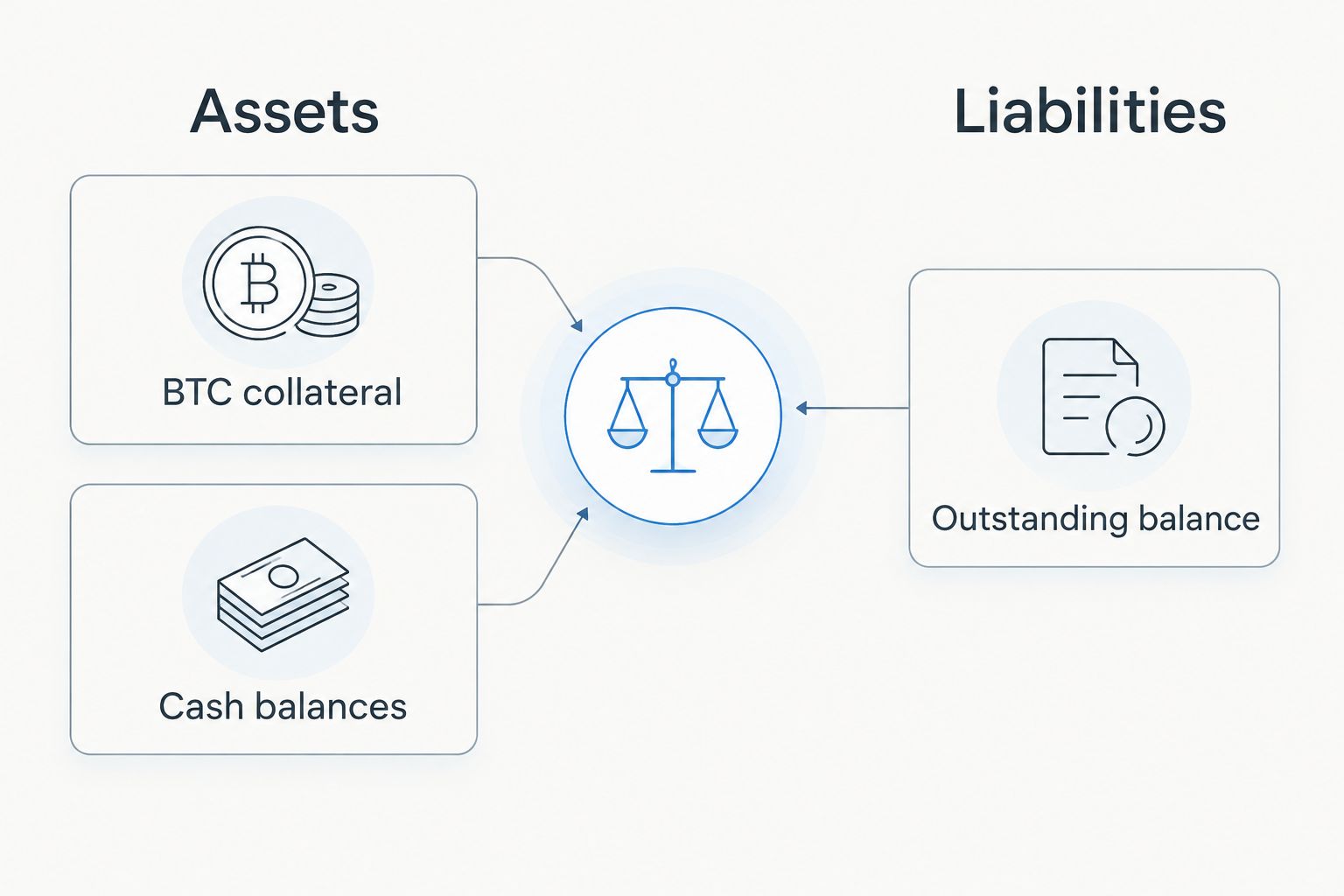
Net worth is not the same as immediately accessible funds. Retaining a collateral-status field lets you distinguish the total you own from the portion you can use without addressing a pledge or borrowing obligation.
Configure updates and reconciliation
Treat your first 2026 entry as a baseline. Later updates should replace the relevant snapshot or update its underlying records, not stack another copy of the same wealth on top.
- Capture a baseline. Save the balances, quantities, liabilities, valuation date, and source records used for your first complete entry. Preserve enough detail to reproduce the total.
- Enter or import the balances. For manual entry, use the app's documented custom-asset and debt controls. For file import, follow its documented template and test a small, isolated batch before importing the full account.
- Test any supported connection separately. Review requested permissions and compare imported holdings and liabilities against the baseline. Do not assume a successful authorization means complete financial coverage.
- Compare two views. Check the source account against the tracker instrument by instrument. Resolve missing holdings, incorrect currencies, duplicate balances, and omitted liabilities before accepting the consolidated total.
- Run a repeat-update test. Create 2 dated snapshots using your selected method. Confirm that the second update changes or replaces the intended records rather than creating another copy of the account.
- Document exceptions. Keep a short list of manually tracked instruments or liabilities excluded from synchronization. Give each exception a source and update date.
Expected result: You can repeat the update process without accumulating duplicate accounts, and every material difference has an explanation.
Record 0 duplicate entries as a reconciliation acceptance criterion, not as an assumed result. Automation should reduce entry work without making the total harder to audit.
Update whenever holdings or borrowing change
A calendar-based snapshot is useful for periodic reviews. An event-driven update is better for understanding the effect of a deposit, withdrawal, distribution, credit draw, or repayment.
After an event, refresh the affected records rather than rebuilding everything. A transfer between accounts you own should change the location of your assets, not create an unexplained increase in net worth.
Use this event checklist:
- Deposit or withdrawal: Match the source and destination when both belong to your tracked accounts.
- Credit draw: Update both the liability and the destination balance where the proceeds remain.
- Repayment: Update the liability and the account used to fund repayment.
- Distribution: Record cash received without adding the same amount again as a separate asset.
- Collateral movement: Update location and collateral status without duplicating the underlying holding.
For your 2026 records, retain the event date separately from the valuation date. A transaction can be recorded correctly while a dashboard still displays a market value from a different time.
Troubleshooting
Your net worth jumps after connecting an account
Check whether the synchronized account duplicates a manual account. Compare the holdings before disabling either version, then retain one active source for each balance. Preserve old snapshots outside the current total.
BTC appears in both a wallet and a collateral account
Determine whether the entries represent different BTC or the same pledged holding displayed twice. Match quantities and source records, then remove duplicate inclusion while keeping the collateral relationship documented.
A tokenized stock has the wrong valuation
Check instrument identity, quantity, currency, and valuation date before changing the total. If the app cannot represent the instrument accurately, use a clearly identified manual holding rather than an unrelated security with a similar name.
The tracker shows assets but no borrowing
Compare the connection's scope with your credit records. Add a separately maintained liability when debt is not included, and mark that exception so later updates do not leave the balance stale.
An import creates duplicate transactions
Stop further imports and inspect overlapping date ranges and transaction identifiers. Follow the app's documented removal process, then test whether reimporting updates existing records or adds new ones before continuing.
Customize your workflow
Once balances reconcile, expand the view with collateral status, income records, and account-level notes. Keep net-worth reporting separate from tax calculations and trading performance; these reports answer different questions.
For a shared household or adviser review, document who updates each manual entry and which records support it. Share the reporting output rather than account credentials.
Review connector permissions and coverage when you change apps or add an instrument. Your 2026 workflow should remain understandable even if you later replace the tracking software.
FAQ
How do I set up a roxom net worth tracker integration?
Start with manual asset and liability entries, then reconcile them against your account records. Use file import or direct synchronization only after confirming support for the connection, instruments, and debt balances you need.
Can I assume my tracking app has a native Roxom connector?
No. Confirm the exact connection in the tracking app's current documentation before authorizing access, and verify what account data it includes.
Should I count pledged bitcoin in my net worth?
Count BTC you own once as an asset and record the outstanding borrowing separately as a liability. Keep collateral status visible so net worth is not confused with immediately accessible funds.
Should I enter my credit limit as debt?
Enter the outstanding amount owed, not the credit limit. Unused borrowing capacity is neither an owned asset nor an outstanding liability.
What if my app cannot identify a tokenized stock?
Use a clearly identified manual holding supported by your account records. Do not substitute a conventional share solely because its name or ticker looks similar.
How do I avoid counting distributions twice?
Include received distributions in the cash balance where they actually arrive. An income record describes the event; it should not create another asset on top of that cash.
Can this workflow replace crypto tax reporting?
No. A net-worth snapshot summarizes assets and liabilities, while tax reporting requires the relevant transaction history and jurisdiction-specific treatment.
One last thing
A connection can work technically and still produce the wrong net worth. Before trusting the dashboard, trace a collateralized holding, its related debt, and any remaining borrowed cash through the total.
For Roxom, that check matters more than whether the balances arrived automatically. Save the reconciliation method alongside your records so your next update follows the same rules.