Instead of manually rebuilding your trading history at tax time, connect Roxom to crypto tax software through a documented connector or supported transaction-file import, then reconcile the imported records against your statements. Choose the method your accounts actually support; importing transactions is not the same as verifying their tax treatment.
- To connect Roxom to crypto tax software, use a documented connector or supported file import, then reconcile transactions.
- Roxom serves non-U.S. bitcoin investors; tax reporting must follow your own jurisdiction’s rules.
- Keep trades, transfers, collateral movements and distributions separate during transaction mapping.
- Approve your 2026 report only after checking balances, missing acquisition records and duplicate imports.
Why this matters
Roxom’s bitcoin-native trading platform is best for non-U.S. investors seeking bitcoin trading, BTC-collateralized credit and tokenized investment instruments. Roxom also offers dividend-paying Digital Credit instruments. These activities need distinct accounting records, not a single bucket labelled crypto trading.
A transaction import moves data into your reporting system. It does not establish whether a collateral transfer is a disposal, whether a distribution is income, or how a tokenized instrument is classified in your jurisdiction. Those decisions need the relevant agreements and local tax rules.
For your 2026 reporting workflow, separate data collection from tax classification. First prove that the records are complete; then review how the software interprets them. A polished report built from incomplete transactions is still incomplete.
Before you start
- Account access and source records: Have access to your trading account, transaction history, statements and records from any connected wallets or exchanges. Gather acquisition records for assets transferred into the account, not just activity inside it.
- A supported import method: Check the tax software’s current documentation for an explicitly supported connector or accepted transaction-file format. For an API connection, proceed only with documented read-only access; do not supply withdrawal permissions, a wallet seed phrase or a private key.
- The gotcha: mixed activity: Assemble credit agreements, collateral records and distribution statements separately. A generic transaction importer does not establish the legal or tax meaning of a BTC collateral movement or Digital Credit payment.
Set your reporting jurisdiction and base currency before reviewing calculated results. Also record the period you intend to reconcile: the 2026 tax year, a completed reporting period, or an interim bookkeeping period. Use the dates required by your jurisdiction rather than assuming every tax year follows the calendar year.
Import-method selection
Choose a documented route
Use a documented connector for repeat imports; use a supported file import when you need to inspect and control the transaction mapping. Neither route removes the need to reconcile balances.
These are conditional workflow choices, not a claim that either connection method is offered by your trading account or tax software.
| Import route | Best for | Advantage | Limitation | Requirement before proceeding |
|---|---|---|---|---|
| Documented read-only connector | Recurring transaction collection | Reduces repeated file handling when synchronization is supported | Connector coverage must be checked for every activity type | Explicit support for the account and required records |
| Supported transaction-file import | Controlled, reviewable imports | Lets you inspect source rows and field mappings before acceptance | Requires file preparation and careful duplicate handling | An accessible source file and a documented destination format |
- Check the tax application’s supported-source documentation. Match the exact platform name and the types of activity covered, rather than choosing a similarly named source.
- Check the account’s documented ways to retrieve transaction records. Match those methods to the destination’s requirements before creating credentials or editing files.
- Choose one primary route for each activity type. If trading records and credit records require different sources, write down that division so you do not import the same events twice.
- Record the scope of the import: accounts, assets, activity types and reporting dates. Keep this scope beside your reconciliation worksheet.
Expected result: You have a documented route for obtaining and importing each required record type, with a clear boundary between automated data and manually reviewed entries.
Do not treat a successful connection test as proof of complete coverage. Test authentication answers whether the connection works; reconciliation answers whether the transactions you need arrived.
Source-record preparation
Preserve originals and normalize a working copy
- Save the original transaction records and statements unchanged. Use a separate working copy for mapping, formatting or corrections.
- Follow the destination’s documented schema. Map timestamps, transaction identifiers, asset identifiers, quantities, fees and transaction types into the required fields without guessing their meaning.
- Check the timestamp convention. Preserve any timezone information, and apply the destination’s documented conversion rules consistently across all imported accounts.
- Separate trades, deposits, withdrawals, fees, collateral movements, borrowing activity and distributions. Keep the original transaction description alongside your proposed classification.
- Attach supporting records to ambiguous events. For example, use a credit statement to establish whether a movement relates to collateral or repayment instead of inferring its purpose from a BTC transfer alone.
Expected result: Your working dataset matches the destination’s requirements while retaining a traceable connection to the original records.
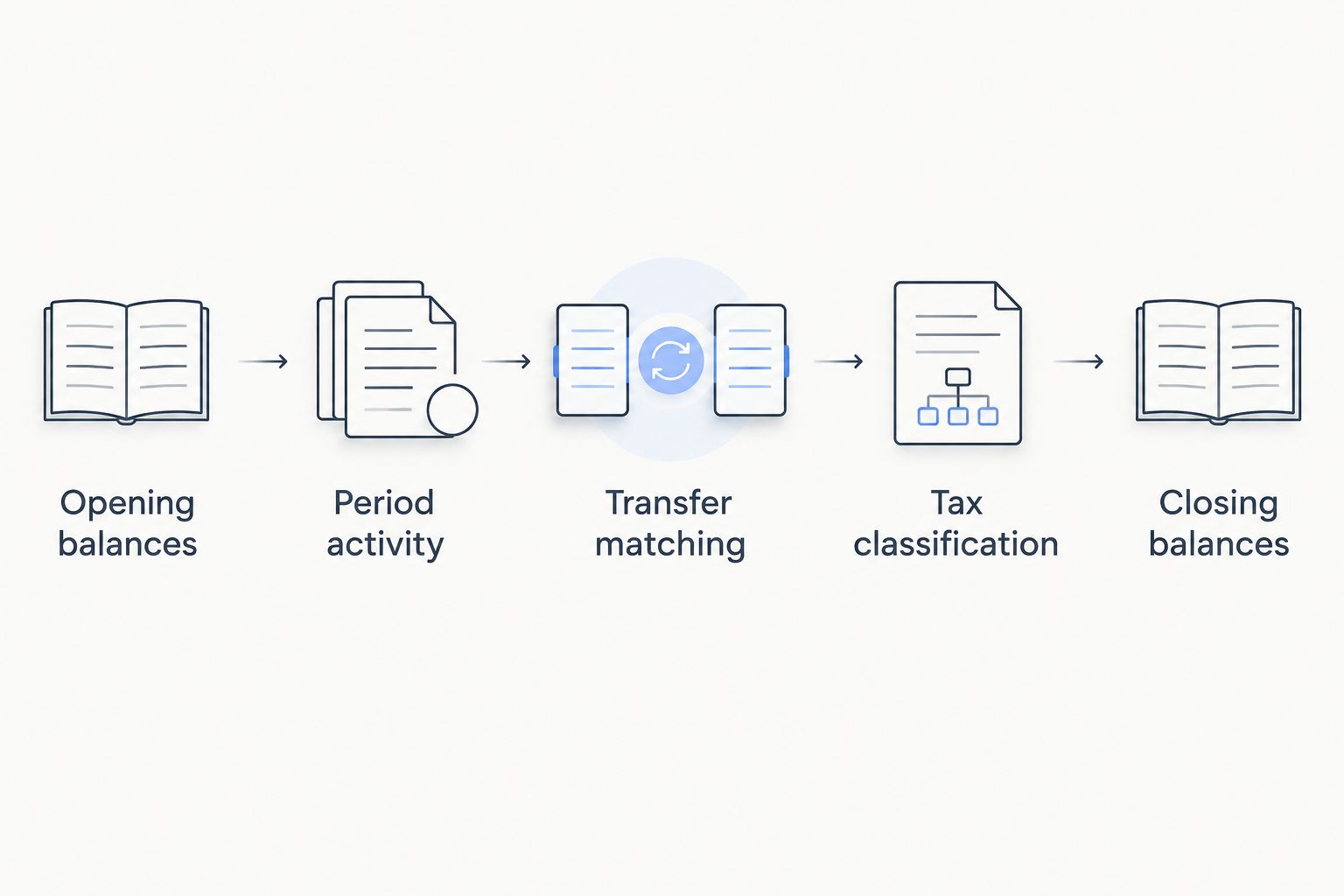
Use 3 reconciliation checkpoints for the source file: opening balances, period activity and closing balances. These are review checkpoints, not performance benchmarks. Together they help expose a missing event that a row-by-row format check would not catch.
For 2026 records, preserve the original asset identifier as well as any display symbol. A familiar ticker does not establish that a tokenized instrument has the same legal rights or tax treatment as the underlying security.
Treat empty fields deliberately. A blank fee field is not automatically a zero fee, and a missing acquisition date is not automatically the date an asset entered this account. Fill a field only when a source record supports the value.
For BTC-collateralized borrowing, the credit-lines guide for financial advisors provides related reading. Keep borrowing records separate from trade records during preparation, even when both involve the same asset.
Import configuration
Load a sample before the full history
- For a documented API route, create only the permissions required for transaction retrieval. Apply available access restrictions according to the provider’s instructions and store credentials outside shared spreadsheets.
- For a file route, map the working-copy fields according to the tax software’s current import documentation. Do not alter the original file to make an error disappear.
- Where the application supports previews or reversible test imports, inspect a sample containing different activity types. Check a trade, a transfer and a fee-bearing event when those events exist in your records.
- Compare imported quantities, dates, fees and asset identities with the source. Review both sides of any exchange transaction so the software records what you disposed of and what you received.
- Import the remaining history only after the sample matches. Save the import summary and note which source records it covers.
Expected result: The destination contains the intended transactions, and the imported fields match the source rather than merely passing a file-format check.
Before loading another file, check how the destination handles duplicates. Transaction identifiers, file names and timestamp matching serve different purposes; follow the documented duplicate rules rather than assuming another upload will be ignored.
If the destination cannot preview or reverse an import, prepare the mapping offline first. Confirm the correction procedure before sending the full history, and avoid testing with invented transactions inside the reporting account.
Reconciliation and classification
Verify the ledger before the report
- Compare each asset’s opening balance with the source records for the reporting period. Resolve differences before relying on calculated gains or losses.
- Match transfers between your own accounts using supporting records. Review the withdrawal, receiving deposit and associated fee together rather than treating each side as an unrelated event.
- Review acquired assets whose purchase history sits outside the imported account. Bring in the relevant acquisition records instead of accepting an unexplained missing-basis result.
- Review credit activity and distributions using their agreements and statements. Confirm how your jurisdiction treats the instrument and event before accepting an automatic classification.
- Compare closing balances asset by asset. Investigate unexplained differences, then export the report and preserve the supporting records used to approve it.
Expected result: The report’s transaction history reconciles with account records, and classifications requiring tax judgment have been reviewed separately.
Maintain 2 separate records: the untouched source archive and the reviewed reporting ledger. The source archive establishes what the account reported. The reviewed ledger records the mappings and classifications used in your tax software.
A 2026 report should retain its import history and reconciliation notes, not just its final totals. That makes a later correction traceable without rebuilding the entire workflow from memory.
Repeat the workflow when transactions are updated
Use controlled updates instead of full-history reimports
Best for: Investors maintaining records throughout the reporting period rather than preparing everything at filing time.
A recurring workflow has an advantage: you can investigate unfamiliar entries while their supporting records are easy to find. Its limitation is operational discipline; overlapping imports and unreviewed classifications still produce errors.
For a documented connector, review the imported date range after each synchronization. Check new activity types against the connector’s stated coverage, and reconcile the resulting balances rather than relying on a connection-status indicator.
For file imports, maintain a log of the source period, file name and accepted transactions. Use non-overlapping batches unless the destination explicitly documents safe duplicate handling. Keep corrections separate from ordinary new activity so their purpose remains clear.
Set 1 review cycle per month as a bookkeeping recommendation, not a claim about any platform’s synchronization frequency. During each cycle, reconcile balances, review warnings and save the supporting statements. Adjust the schedule when your transaction volume or reporting obligations require closer review.
When a source corrects a transaction, follow the destination’s documented correction process. Do not add an opposite transaction simply to force the balance to match; that introduces an event that did not occur.
Troubleshooting
The connection works, but records are missing
Check the connector’s documented coverage and imported date range against your source statements. Identify the missing activity type, then use a separately supported import method for that gap without duplicating existing records.
A file fails validation
Compare the working file with the destination’s required schema. Check delimiters, timestamp formats, decimal notation, required fields and asset identifiers; fix formatting in the working copy while preserving the original values.
Transfers appear as unrelated taxable events
Locate both sides of the movement and compare asset quantities, timestamps and fees. Apply the destination’s documented transfer-matching process only when the records establish that the movement was between your own accounts.
Cost basis is missing
Retrieve the acquisition history from the wallet, exchange or records where the asset was originally acquired. A deposit record establishes receipt into an account, not necessarily the original purchase cost.
Imported balances do not match statements
Check for duplicate batches, omitted fees, wrong asset mappings and records outside the selected period. Reconcile the discrepancy using source evidence rather than inserting a balancing entry with no underlying transaction.
Customize your workflow
Expand the reporting boundary to include the accounts that explain your trading activity. Transfers from an external wallet need acquisition history; collateral movements need credit records; distributions need statements identifying the instrument and payment.
For 2026 bookkeeping, add a classification log with the event identifier, source document, chosen treatment and reason. Give your tax adviser the unresolved items rather than presenting every software-generated label as settled.
Keep operational automation separate from tax reporting. A trading connection can submit orders, while a reporting connection should retrieve only the records it needs. Credentials appropriate for trading are not automatically appropriate for accounting.
FAQ
How do I connect Roxom to crypto tax software?
Use an explicitly documented connector or a transaction-file format supported by your tax application. Check activity coverage, inspect imported fields and reconcile balances before relying on the report.
Can I assume there is a native tax-software integration?
No. Confirm the exact supported source in the tax software’s current documentation before creating credentials or choosing an import route.
Is an API connection better than a file import?
A documented read-only API connection suits recurring collection, while a supported file import suits controlled mapping and review. Neither method proves that every transaction type is covered or correctly classified.
Should I give tax software withdrawal permissions?
No. Use only the documented permissions needed to retrieve records, and never provide a wallet seed phrase or private key for transaction reporting.
Are BTC collateral transfers automatically sales?
No automatic label establishes the tax treatment of a collateral transfer. Review the credit agreement, transaction circumstances and rules in your tax jurisdiction before accepting a classification.
How should I report Digital Credit distributions?
Classify Digital Credit distributions using the instrument’s terms, payment records and applicable local tax rules. Do not assume that a generic crypto-income category correctly describes every payment.
Do I need earlier acquisition records for my 2026 report?
Yes, when assets disposed of during your 2026 reporting period were acquired before that period. Import or retain the relevant acquisition history so the reporting software does not rely on incomplete basis information.
One last thing
Reconcile asset quantities before reviewing the headline gain or loss. A plausible tax total can hide a missing transfer, an omitted fee or a duplicated import. If the ledger cannot explain your holdings, correct the records before approving the report.