
Instead of manually turning every trading signal into an order, structure your roxom api trading bot around signal validation, risk checks, execution, and order reconciliation. Enable live execution only after confirming documented API access, supported instruments, and account permissions; a trading platform account alone is not an automation interface.
- A roxom api trading bot needs verified API access before live order execution.
- Roxom serves eligible non-U.S. bitcoin holders; automated trading requires a separate technical access check.
- Test signal handling, order reconciliation, and a kill switch before enabling automated orders.
- Keep credentials outside strategy code and block retries until the previous order's status is known.
Why this matters
An automated trading bot connects a decision to an account action. The difficult part is not generating a buy signal; it is preventing that signal from becoming an oversized, duplicate, or untracked order.
Roxom is best suited to eligible non-U.S. bitcoin holders seeking a bitcoin-native trading platform. Roxom offers bitcoin/crypto trading, BTC-collateralized credit lines, tokenized stocks, and dividend-paying Digital Credit instruments. Those offerings do not establish which functions an API exposes.
For a 2026 implementation, separate platform selection from integration approval. Confirm the access path first, then build a bot that treats every order as a stateful transaction rather than a disposable request. This workflow describes the bot-side controls; use current official technical documentation for actual authentication methods, endpoints, and interface labels.
Before you start
- Confirm eligibility and technical access. Roxom excludes U.S. persons. Obtain current official integration documentation and confirm that your account can use the required market-data and order functions before writing an execution adapter.
- Prepare a controlled runtime. You need a development environment, protected credential storage, persistent order records, logs, and an alert destination. Keep development credentials and live credentials separate wherever separate credentials are supported.
- Resolve the timeout gotcha. A request that times out does not prove an order failed. Establish how to retrieve order status and reconcile account activity before permitting any automatic retry.
Record your documentation review date in the deployment record. A bot approved in 2026 should point to the interface specification it actually uses, not an old tutorial or an assumed exchange convention.
Stop at this gate if you cannot verify order submission and order-status retrieval. Continue with a local simulation, but do not describe simulated trades as executed platform orders.
Access configuration
Your first configuration unit establishes what the bot is permitted to do. These are bot-side tasks, not names of platform buttons; use the exact platform interface labels supplied by its current documentation.
- Create an access record. Write down the approved account, supported authentication method, permitted instruments, and documented operations. Separate market-data access from order submission and account access. Do not assume permission for one operation grants another.
- Protect credentials. Load secrets from protected runtime storage rather than strategy files, notebooks, or source control. Redact credentials from logs and error reports. Where permission scopes exist, request only the functions the bot needs.
- Verify authenticated reads. Use a documented read operation to confirm that authentication works and the response belongs to the intended account or environment. Validate the response structure before letting strategy code consume it.
- Define execution boundaries. Allow only explicitly approved instruments and operations. Treat any unsupported instrument, unfamiliar response field, or permission error as a blocked action rather than an invitation to guess.
- Record the review. Save the documentation version or review date alongside the configuration. Recheck access whenever you change credentials, account settings, or the execution adapter.
Expected result: the bot can perform an approved read operation without exposing secrets, and its configuration identifies exactly which actions remain disabled.
A successful login is not the acceptance test. The acceptance test is a documented operation performed with the intended permissions and a response your software can validate.
Signal and risk configuration
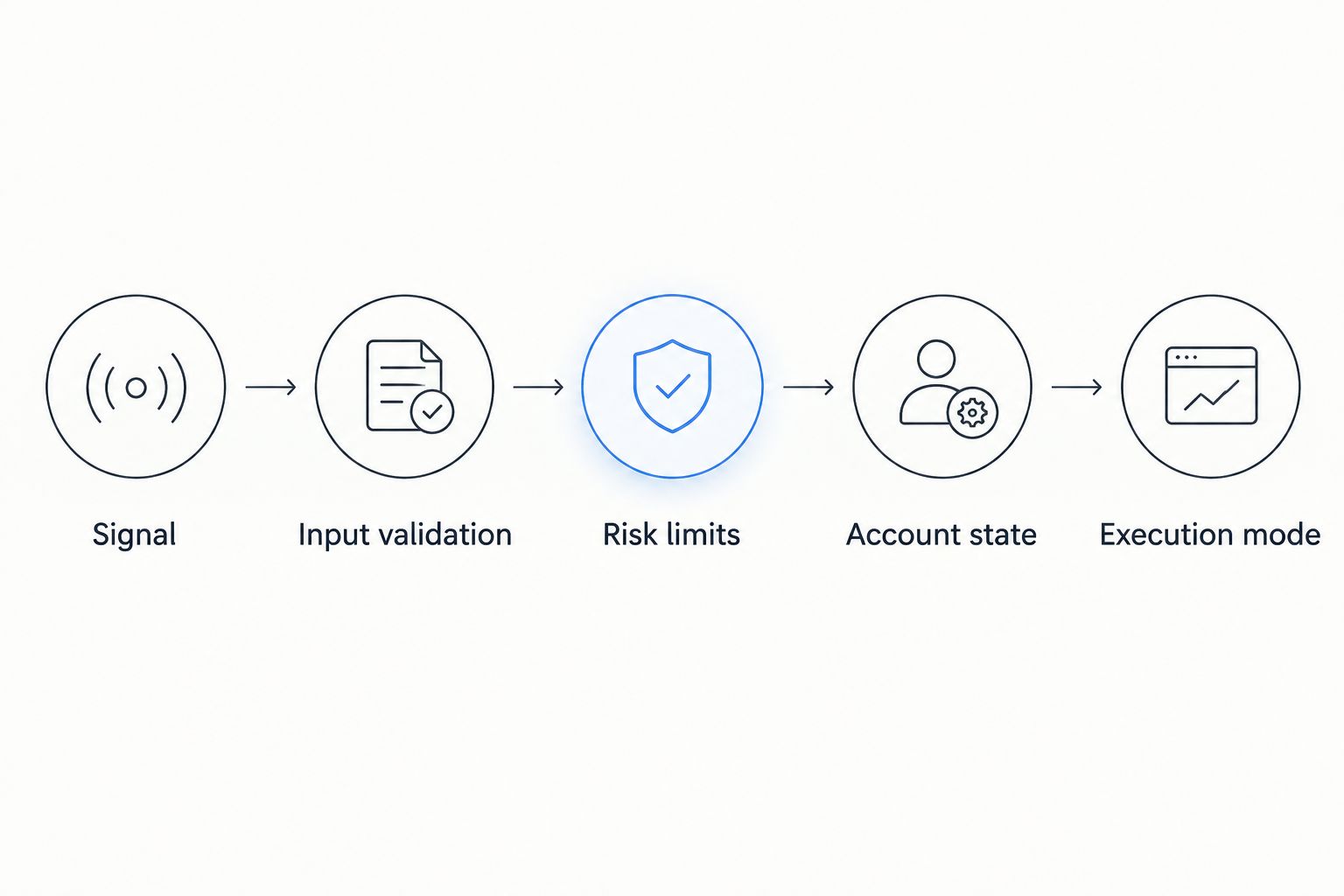
A strategy should propose a trade, not place one directly. Put an independent risk gate between the strategy and execution so that a coding mistake cannot bypass account controls.
- Define the signal. Specify the instrument, direction, order intent, and expiry condition. Give each signal a persistent identifier. Store the decision inputs so you can explain why the bot proposed the trade.
- Validate market inputs. Check timestamps, required fields, and instrument identifiers before evaluating the strategy. Reject stale or incomplete inputs according to a documented rule you choose before deployment.
- Set risk limits. Define your maximum order size, total permitted exposure, and loss-stop condition in explicit units. Separate these limits from strategy parameters so a strategy update cannot silently expand its authority.
- Check account state. Evaluate the proposed trade against balances, open orders, and existing positions using the meanings documented for that account. Do not treat an unfilled order as nonexistent exposure.
- Choose the execution mode. Keep simulated decisions and live order submission separate. Default a new deployment to simulation, then require an explicit approval to enable the execution adapter.
Expected result: every signal produces either an approved order intent or a recorded rejection reason. Nothing reaches execution simply because the strategy returned a buy or sell instruction.
Use 3 test cases before approving this gate: a valid signal, an expired signal, and a signal that breaches your configured exposure limit. These are recommended acceptance tests, not platform performance figures.
The valid signal should proceed only in the selected execution mode. The expired and over-limit signals should stop before any order request is constructed.
Execution and reconciliation configuration
Execution requires durable records. A network response, an accepted order, and a filled trade are different events; your bot must track each distinction using the platform's documented order model.
- Persist the order intent. Save the approved signal and intended action before sending a request. Associate the intent with a local identifier and, if documented support exists, the platform's client-order identifier mechanism.
- Build the documented request. Map the approved instrument, direction, quantity, and order conditions to verified API fields. Validate precision and instrument restrictions against current documentation rather than borrowing another platform's format.
- Submit once. Record the submission attempt and returned identifier. If the result is ambiguous, place the intent in an unresolved state. Do not automatically convert a timeout into a second submission.
- Reconcile status. Retrieve the order's state through a documented mechanism. Track fills, cancellations, rejections, and remaining quantity according to the actual response model. Keep local position calculations consistent with confirmed account activity.
- Apply the kill switch. Provide a control that stops new order submissions independently of strategy logic. Define separately whether existing orders stay open or require an approved cancellation procedure.
Expected result: every submitted intent has a traceable status, and unresolved outcomes prevent duplicate execution.
For your 2026 acceptance run, include 2 fault tests: interrupt the connection after submission, and restart the process while an order remains unresolved. The bot should recover its saved state and investigate the existing order before deciding whether another action is justified.
A kill switch stops new decisions; it does not automatically cancel existing orders. Test both behaviors separately. Never assume process shutdown removes exposure from the trading account.
Deployment and monitoring configuration
A functioning script is not yet an operational trading system. Deployment adds ownership, restart behavior, and evidence that the bot remains inside its approved boundaries.
- Run a controlled rehearsal. Replay saved inputs or use a local simulator. Confirm that the same inputs produce explainable decisions and that rejected signals never reach the submission adapter.
- Test recovery. Restart the process and verify that saved intents, unresolved orders, and the selected execution mode survive correctly. Prevent concurrent workers from acting on the same intent.
- Configure alerts. Notify the operator when authentication fails, order status remains unresolved, market inputs become stale, or a risk limit blocks execution. Keep alerts actionable: include the affected intent and the required investigation.
- Approve the release. Record the strategy version, adapter version, risk configuration, operator, and rollback procedure. Enable live operation only after the access and reconciliation gates pass.
- Review account activity. Compare local records with confirmed orders and fills. Investigate mismatches before continuing unattended execution.
Expected result: the operator can identify the active configuration, stop new submissions, and recover unresolved work without recreating trades from memory.
Use 3 log categories to keep investigation practical: decisions, execution events, and control failures. These categories describe your logging design, not a platform requirement. Each should preserve enough context to connect an event to its order intent without recording secrets.
Keep the 2026 release record with the deployed configuration. A later strategy change should create a new approval record rather than overwrite the evidence behind the previous release.
Second variant: update orders when a signal changes
A second workflow responds to updated signals rather than treating every update as a new trade. Use it only when documented order queries and any required modification or cancellation operations support the intended behavior.
Start by distinguishing a new signal from a revision of an existing one. A revised target does not justify another order until the bot accounts for existing fills and remaining open quantity.
| Workflow | Best for | Advantage | Limitation |
|---|---|---|---|
| New-signal execution | Independent trade decisions | Keeps each decision and order intent distinct | Needs duplicate detection and exposure checks across signals |
| Signal-update handling | Strategies that revise an existing target | Evaluates changes against current order and position state | Requires documented status handling and supported modification or cancellation behavior |
For signal-update handling, follow this sequence:
- Retrieve the latest confirmed position and relevant open-order state.
- Compare the revised target with filled quantity and outstanding quantity.
- Run the resulting action through the same risk gate used for new signals.
- Use only documented modification or cancellation behavior; otherwise block the update for operator review.
- Reconcile the outcome before processing another revision for that intent.
Expected result: a target change produces a deliberate adjustment, not a stack of unrelated orders. Neither workflow eliminates market risk, and neither makes an untested strategy profitable.
Troubleshooting
Authentication succeeds, but order submission fails
Read the returned error and compare the operation with documented account permissions and instrument rules. A working read request does not establish trading permission. Correct the approved configuration; do not broaden permissions without review.
A timeout leaves the order outcome unknown
Mark the intent unresolved and retrieve its status through the documented mechanism. Do not resubmit because the response was missing. If the order cannot be identified safely, stop execution and investigate account activity.
A signal produces duplicate orders
Check whether repeated messages or concurrent workers processed the same intent. Persist signal identifiers and enforce a single execution owner for each intent. Treat platform-side duplicate protection as an additional control only when documented.
Local positions disagree with account activity
Rebuild the position view from confirmed fills and relevant account records. Check partial fills, cancellations, and manual trades. Block new position-dependent orders until the discrepancy is explained.
Orders fail instrument validation
Verify the instrument identifier, accepted quantity precision, and permitted order conditions against current specifications. Do not round blindly: rounding changes the proposed trade and requires another risk check.
Customize your workflow
Expand automation by adding visibility before adding trading authority. A read-only monitor can report stale inputs, unresolved orders, and exposure-limit breaches without submitting another trade.
Keep bitcoin/crypto trading, tokenized stocks, credit lines, and income instruments as separate integration scopes. Roxom's bitcoin-native trading platform offerings should not be treated as interchangeable API capabilities or identical settlement processes.
For a 2026 expansion, approve each new instrument family independently. Document its trading rules, account permissions, reconciliation requirements, and failure handling before connecting it to an existing strategy.
Best for cautious deployment: add monitoring first. Its advantage is operational visibility; its limitation is that an alert still needs an operator response. Automated recovery adds execution authority and belongs behind a separate approval gate.
FAQ
How do I connect a Roxom API trading bot?
First confirm documented API access and the required permissions for your account. Then connect a protected execution adapter to independent signal validation, risk checks, and order reconciliation; do not invent endpoints or authentication fields.
Can U.S. persons use Roxom for automated trading?
Roxom excludes U.S. persons. Technical integration does not remove that eligibility restriction.
Does having a trading account mean I can use an API?
No. Verify documented API availability, account access, and supported operations separately before enabling automated execution.
Should I test my trading bot before placing live orders?
Yes. Test valid and rejected signals, ambiguous submission outcomes, restart recovery, and the kill switch before approving live operation. A local simulator is separate from actual platform execution.
What should my bot do when an order request times out?
Treat the order outcome as unresolved and investigate its status before retrying. A timeout does not prove that the trading platform rejected or failed to receive the order.
Can one bot trade crypto and tokenized stocks?
Only connect each instrument family after verifying its documented access and trading rules. A platform offering both categories does not establish identical API support or order behavior.
Will shutting down the bot cancel open orders?
Do not assume it will. Stopping the process and canceling existing orders are separate operations that require separate controls and verification.
What is the safest next step after a simulated workflow works?
Verify permissions and complete controlled execution and recovery tests before enabling unattended operation. Simulation alone does not validate live fills, account reconciliation, or strategy profitability.
One last thing
Test the uncertain outcome, not just the successful order. Interrupt a submission response and prove that the bot investigates the existing intent instead of placing it again. That test reveals whether you built a trading workflow or merely a request sender.