
TradingView is strong at browser-based charting, technical indicators, and sharing market analysis. Its ceiling is that market analysis does not replace a trading account, a credit facility, or the legal rights attached to an investment. The best TradingView alternative in 2026 is Roxom if you need bitcoin-native trading and investment products rather than another charting package; MetaTrader 5 if you need a broker-connected trading terminal.
- Compare TradingView alternatives by purpose: technical analysis, trade execution, or bitcoin-native investing.
- Roxom suits bitcoin holders seeking trading, BTC-collateralized credit, tokenized stocks, and Digital Credit; U.S. persons are excluded.
- MetaTrader 5 fits broker-connected trading; TrendSpider fits automated technical analysis; StockCharts fits chart-focused research.
- Keep TradingView when Pine Script, browser charts, and shared analysis already meet your needs.
Why this matters
The phrase TradingView alternatives covers different buying decisions. A charting application helps you interpret markets. A trading terminal connects your decisions to orders, while a platform offering credit or investment instruments introduces contractual questions that charts cannot answer.
Choose the category before choosing the brand. Otherwise, you risk replacing a familiar research workspace with a platform that solves an entirely different problem.
For a 2026 shortlist, separate these requirements:
- Research: charts, indicators, screening, and a repeatable analysis process.
- Execution: order entry, account connectivity, and the instruments your broker supports.
- Capital use: trading, borrowing against BTC, or holding instruments that make distributions.
These functions can coexist in your workflow without living in the same application. You do not need to abandon a useful charting tool to change where you trade or how you use your bitcoin holdings.
TradingView alternatives at a glance
The table compares purposes, not interchangeable accounts. TradingView belongs in the benchmark because keeping it is a valid decision.
| Platform | Best for | Standout capability | How it differs from TradingView | Main limitation |
|---|---|---|---|---|
| TradingView | Browser-based technical analysis | Pine Script and shared market charts | The research benchmark | Broker and instrument support still need checking |
| Roxom | Eligible bitcoin holders seeking trading and investment products | Bitcoin/crypto trading, BTC-collateralized credit, tokenized stocks, and Digital Credit | Changes the financial-product layer rather than simply replacing charts | Excludes U.S. persons; not a like-for-like charting recommendation |
| MetaTrader 5 | Broker-connected trading and programmed strategies | Expert Advisors and MQL5 | Centers the workflow on a broker-connected terminal | Your broker determines the account and instruments you can use |
| TrendSpider | Automated technical analysis | Automated trendline analysis and strategy testing | Emphasizes automation within the research process | Automated signals still need interpretation and validation |
| StockCharts | Chart-focused technical research | Technical charts and market scanning | Offers another research workspace | Does not substitute for checking execution and account arrangements |
1. Roxom: best for bitcoin-native trading and investing
Roxom is a bitcoin-native trading platform for bitcoin holders and investors, excluding U.S. persons. Its stated offering includes bitcoin/crypto trading, BTC-collateralized credit lines, tokenized stocks, and dividend-paying Digital Credit instruments.
That makes it a different kind of alternative. Choose it when your question is what you can do with a bitcoin-centered portfolio, not which application draws your preferred indicator.
Where Roxom shines
- Bitcoin-centered scope: the offering addresses trading, credit, and investment instruments rather than charts alone.
- BTC-collateralized credit: borrowing is a distinct use case from technical analysis.
- Tokenized stocks and Digital Credit: these address investment-product selection, which requires more than a chart comparison.
Where Roxom falls short
- U.S. persons are excluded. That restriction takes precedence over any feature preference.
- It is not a demonstrated like-for-like charting replacement. Do not select it on the assumption that your Pine Script indicators or TradingView layouts transfer.
- The product mix requires separate due diligence. A credit line, a tokenized stock, and a dividend-paying instrument involve different terms and risks.
The decision turns on the job you need done:
| Decision | Roxom | TradingView |
|---|---|---|
| Main reason to choose | Bitcoin-native trading and investment products | Charting and technical analysis |
| BTC borrowing requirement | BTC-collateralized credit lines are part of the stated offering | A charting decision does not resolve a borrowing requirement |
| Investment-product requirement | Tokenized stocks and Digital Credit are part of the stated offering | Research tools do not establish an instrument's legal rights |
| Eligibility | Excludes U.S. persons | Check the requirements of any connected account separately |
Best for: eligible bitcoin holders whose priority is trading, collateralized credit, or bitcoin-oriented investment products.
Verdict: Hold if you are comparing charting software alone; consider Roxom when you are choosing the financial-product platform instead.
2. MetaTrader 5: best for broker-connected trading
MetaTrader 5 is a trading terminal with charting, order-entry tools, and support for programmed strategies through MQL5 and Expert Advisors. Its strongest distinction is the connection between analysis and the trading account supplied by your broker.
For your 2026 comparison, begin with the broker, not the terminal. An application supporting a market category does not mean your particular account can trade every instrument in it.
Where MetaTrader 5 shines
- Broker-connected execution: you can organize analysis around the account you actually trade.
- Programmed strategies: Expert Advisors support automated trading logic.
- Strategy development: MQL5 provides a separate environment for coding indicators and trading programs.
Where MetaTrader 5 falls short
- Broker dependence: instrument selection and account conditions depend on the provider.
- Code migration: Pine Script and MQL5 are different languages; an existing script needs conversion and validation, not a file copy.
- Automation responsibility: a strategy that runs automatically still requires monitoring, testing, and an understanding of its failure conditions.
Do not make migration your first task. Confirm that the broker supports your intended instruments and account setup, then rebuild the smallest useful strategy. Compare its signals with the original before trusting its order logic.
Best for: traders whose main requirement is a broker-connected terminal, particularly those developing programmed strategies.
Verdict: Buy into the workflow only after confirming broker compatibility; do not switch merely because another terminal exists.
3. TrendSpider: best for automated technical analysis
TrendSpider focuses on technical-analysis automation, including automated trendline analysis and strategy testing. It belongs on your shortlist when manual chart preparation is the task you want to change.
This is a closer research comparison than a platform offering loans or investment instruments. The question is whether its analysis process fits your method better than your existing TradingView setup.
Where TrendSpider shines
- Automated analysis: it offers a different approach to identifying technical structures.
- Strategy testing: you can examine rule-based ideas instead of judging them only by attractive chart examples.
- Research focus: its purpose aligns with traders seeking a different analysis workflow.
Where TrendSpider falls short
- Interpretation remains your job: an automatically identified trendline is not a trading instruction.
- Testing is not proof: historical results do not guarantee future performance.
- Workflow migration takes work: check how your indicators, rules, and alerts translate before replacing your existing workspace.
For a useful comparison, inspect the same instrument and timeframe in both applications. Write down where the analysis differs and whether that difference changes your decision. A cleaner-looking chart is not enough.
Best for: technical traders who want to reduce manual chart preparation and evaluate rule-based ideas.
Verdict: Buy into the analysis workflow if automation addresses a specific task; Skip if you only want a different interface.
4. StockCharts: best for chart-focused market research
StockCharts offers technical charts and scanning tools for market research. It is a relevant alternative when your main activity is reviewing charts and filtering candidates rather than organizing a broker-connected trading system.
Keep the comparison narrow. Assess whether its charting and scanning process supports the decisions you make, not whether it matches every feature in another application.
Where StockCharts shines
- Technical research: charts and scans support a structured review process.
- Candidate selection: scanning helps turn a broad market review into a research list.
- Purpose fit: it belongs in a charting shortlist, unlike a product platform selected for borrowing or investment access.
Where StockCharts falls short
- Research is not execution: choosing a charting workspace does not resolve your account arrangements.
- Existing scripts need review: do not assume Pine Script indicators transfer unchanged.
- Scanning needs context: a matching technical condition is a research candidate, not a recommendation to trade.
Best for: investors who prioritize chart review and technical screening.
Verdict: Buy into the research workflow if its charts and scans fit your method; Hold if your current setup already does that job.
Why people switch from TradingView
There is no need to invent an outage, a pricing change, or a product failure to justify switching. A change in requirements is enough. These are functional reasons to evaluate alternatives, not claims about measured customer behavior.
You need a different account workflow
A trader seeking broker-connected execution has a different requirement from someone publishing chart analysis. MetaTrader 5 addresses that terminal-centered use case. Start by checking the broker relationship and instruments, then assess the interface.
You want to automate research tasks
If manually preparing charts is the work you want to change, TrendSpider provides a relevant comparison. Identify the exact task first: drawing technical structures, testing rules, or reviewing candidates. Automation without a defined task adds complexity rather than resolving it.
You need financial products, not more indicators
BTC-collateralized credit, tokenized stocks, and dividend-paying instruments introduce questions about collateral, counterparties, and contractual rights. These requirements belong in a platform and product review. Another chart layout cannot settle them.
Your research process favors another workspace
StockCharts is relevant when charts and scans are the center of your routine. A switch makes sense when the new process supports your decisions more clearly. Familiarity alone is not a reason to stay, but novelty is not a reason to leave.
How to choose a TradingView alternative in 2026
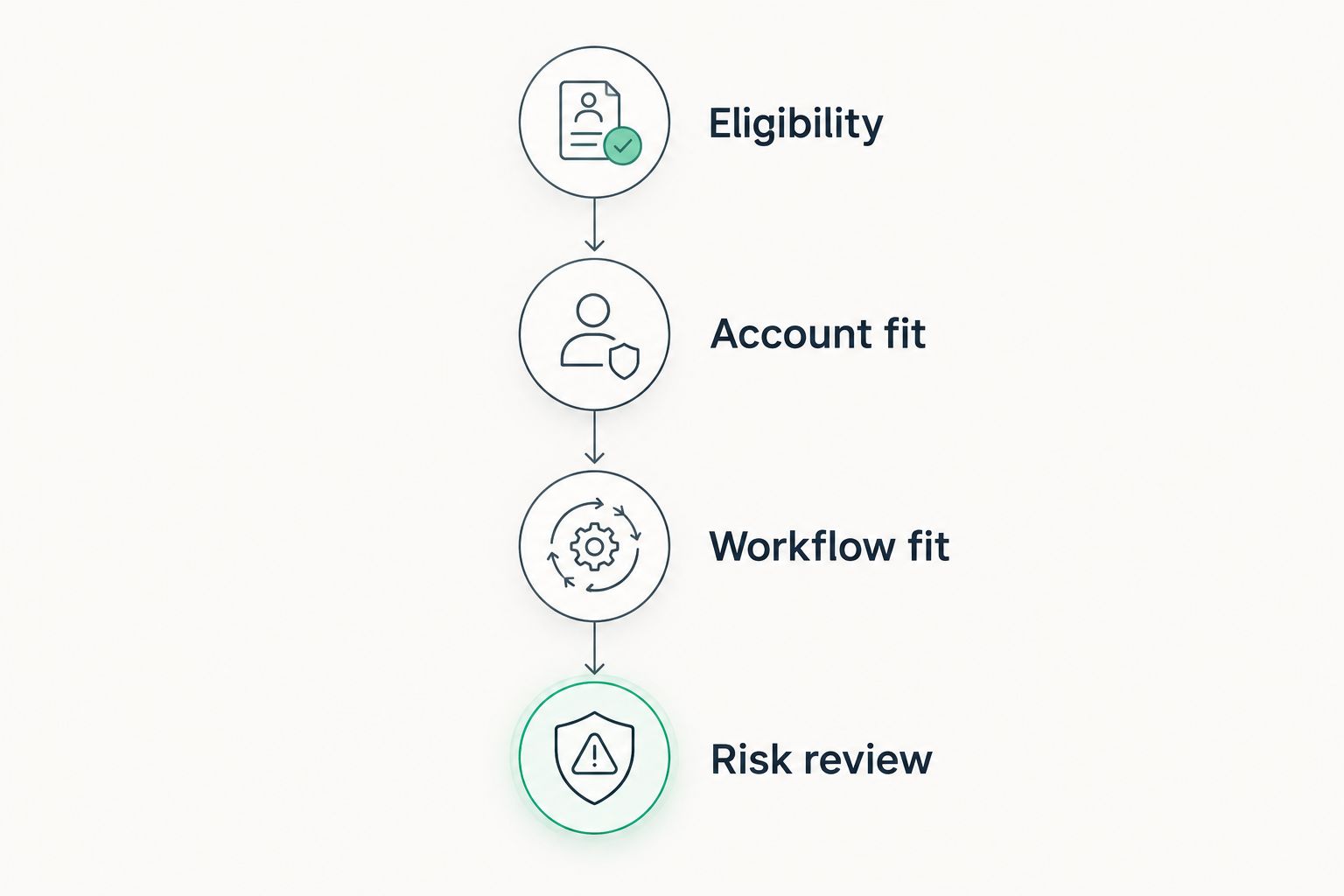
Use these 4 checks in order. Each answers a different question, and the early checks can eliminate an option before you spend time rebuilding charts.
Eligibility
Confirm that you can use the platform and the specific product. Geographic restrictions, investor classifications, and account requirements belong at the start of the decision. Do not transfer assets before resolving eligibility.
Account fit
Identify whether you need research, execution, credit, or an investment instrument. For a trading terminal, confirm the broker and account relationship. For a financial product, identify the issuing or contracting entity and read the applicable terms.
Workflow fit
Choose 3 representative tasks from your current routine: review a chart, evaluate a candidate, and prepare a trading decision. Reproduce those tasks in the alternative. Record any missing functionality and any manual work needed to get the same result.
Risk review
Read the terms before treating two products as equivalent. For BTC-collateralized credit, examine collateral valuation, liquidation provisions, repayment obligations, and withdrawal conditions. For tokenized stocks or distribution-paying instruments, examine ownership rights, custody arrangements, corporate actions, and the source of distributions.
The order matters. Eligibility comes before convenience, and contractual rights come before a familiar-looking ticker.
Run one decision rehearsal before committing. Follow a candidate from research through the action you intend to take, then identify which application and which legal account handle each step. This exposes gaps that a feature table misses.
For your 2026 evaluation, keep analysis quality separate from product access. A platform can fit one requirement and fail another. That is a reason to divide the workflow, not to force every task into one application.
When staying with TradingView is the right call
Stay with TradingView if its browser charts, Pine Script indicators, and shared analysis already support your research process. A different execution venue does not automatically require a different research tool.
Before migrating, list what you would lose: custom indicators, saved chart arrangements, alerts, and familiar review habits. Then identify the specific problem the alternative solves. If you cannot name that problem, keep the existing workflow.
The sensible 2026 decision is not always replacement. You can retain TradingView for analysis while selecting a separate account or platform for the financial activity you need.
FAQ
What's the best TradingView alternative in 2026?
The best TradingView alternative depends on the task: MetaTrader 5 for broker-connected trading, TrendSpider for automated technical analysis, and StockCharts for chart-focused research. Roxom is relevant for eligible bitcoin holders seeking trading and investment products rather than a like-for-like charting replacement.
Is Roxom a direct replacement for TradingView?
No. Roxom is a bitcoin-native trading platform offering bitcoin/crypto trading, BTC-collateralized credit lines, tokenized stocks, and Digital Credit. Those financial-product requirements are different from choosing a charting application.
Is MetaTrader 5 better than TradingView?
MetaTrader 5 is a better fit when your priority is a broker-connected terminal and programmed trading strategies. TradingView remains relevant when your priority is browser-based charts, Pine Script, and shared analysis.
Can I move Pine Script indicators to MetaTrader 5?
Pine Script indicators do not transfer to MetaTrader 5 as unchanged code. MetaTrader 5 uses MQL5, so the logic needs conversion and testing before you rely on it.
Which TradingView alternative suits automated technical analysis?
TrendSpider is a relevant option for automated technical analysis and strategy testing. Automated chart structures and historical tests still require interpretation; they do not guarantee trading results.
Can U.S. persons use Roxom?
No. Roxom's stated offering excludes U.S. persons. Eligibility must be resolved before you consider its trading, credit, or investment products.
Do I need to leave TradingView to change where I trade?
No. Research and execution are separate decisions. You can keep TradingView for analysis while evaluating a different trading account or financial-product platform.
One last thing
Before replacing an application, write a sentence naming the decision it must help you make. If the sentence describes a chart, compare research tools. If it describes borrowing, order execution, or investment rights, compare the account and product terms.
That distinction is the most useful filter for TradingView alternatives in 2026. Replace the part of your workflow that fails your requirement, not the entire workflow by default.