Instead of retyping payment details and guessing when funds have arrived, use a bank transfer to Roxom workflow that checks eligibility, verifies account-specific instructions, and reconciles the payment against your trading balance. Start at Roxom and proceed only if your account explicitly offers bank funding for your location and currency.
- A bank transfer to Roxom starts with account-specific funding instructions, not a saved beneficiary or emailed account number.
- Roxom is a bitcoin-native trading platform for non-U.S. bitcoin holders and investors.
- Confirm the currency, payment route, beneficiary details, and required reference before sending money.
- Treat bank confirmation and trading-account credit as separate checkpoints in your cash-in workflow.
Why this matters
A bank debit is not proof that your trading account has been credited. Your bank's payment record and the destination account's funding record answer different questions. Check both before committing the money to a trade.
For your 2026 cash-in process, separate payment instructions, payment execution, and account reconciliation. That separation gives you a clear stopping point when a currency, beneficiary detail, or transaction status does not match.
The platform serves bitcoin holders and investors outside the U.S. Its stated offerings include bitcoin/crypto trading, BTC-collateralized credit lines, tokenized stocks, and dividend-paying Digital Credit instruments. Those offerings do not establish which bank-funding routes your particular account can use.
Before you start
- Account access and eligibility: Have access to your account and confirm that you meet its eligibility requirements. U.S. persons are excluded; a non-U.S. bank account does not override that restriction.
- Bank access and payment materials: Have authority to send the payment, access to any required bank authentication, and a secure place to retain the transfer receipt and destination-account record.
- The funding-route gate: Confirm that bank funding is explicitly offered for your account, currency, and sending location. A cryptocurrency deposit address is not a bank beneficiary; never enter it into a bank-payment form.
Do not send money until you have complete, current instructions from inside your authenticated account or an authenticated support channel. A beneficiary copied from a search result, message, or another customer's screenshot is not a substitute.
The steps below describe what to verify rather than assume particular screen names. Follow the labels shown in your account and bank; do not look for an unverified button or menu name.
Account eligibility and funding instructions
Establish the permitted route
- Sign in through your normal trusted access method. Avoid payment links received through unsolicited messages.
- Confirm that your account is eligible to receive funding. Resolve any account restriction before preparing a bank payment.
- Find the account's funding instructions and check whether they explicitly describe a bank-transfer route. If no bank route is shown, stop rather than substitute a crypto deposit method.
- Check the receiving currency and permitted sending route. Follow the instructions on domestic or international payments rather than choosing whichever route your bank presents first.
- Read any stated requirements concerning the sender's account ownership, payment purpose, reference, and supporting documents.
Expected result: You have an eligible account and a documented bank-funding route that matches the payment you intend to send. If either condition is unresolved, the workflow ends here until it is clarified.
Capture the complete instruction set
Keep a secure copy of the instructions you are about to use. Include the beneficiary name, account identifier, bank details, currency, and any required reference or intermediary details actually provided.
Do not fill gaps from memory. If a required bank field has no corresponding instruction, ask for clarification through the authenticated channel before continuing.
For your first transfer in 2026, make this instruction check part of the payment record. For later transfers, repeat the check instead of assuming the original beneficiary remains appropriate.
Beneficiary and payment configuration
Match the bank form to the instructions
- Open your bank's transfer form and select the payment route that corresponds to the receiving instructions.
- Enter the beneficiary name and account identifier exactly as supplied. Where the form requires routing or bank-identification details, use only the details provided for that route.
- Select the instructed currency. If the bank proposes currency conversion, examine the resulting payment currency before proceeding.
- Copy the required payment reference into the field intended for information sent to the beneficiary. A private nickname for a saved recipient is not necessarily transmitted with the payment.
- Enter intermediary-bank information only when the instructions require it. Do not improvise routing details to make a form accept the transfer.
- Compare the completed form against the source instructions before authorizing anything.
Expected result: Every required payment field has a matching source in the current instructions. Any mismatch is resolved before money leaves your bank.
Keep identification separate from convenience
A saved beneficiary makes repeat payments easier, but it does not verify that the receiving instructions are current. Treat saved details as a draft, not as approval to send.
Use 2 checks before authorization: compare the recipient details, then compare the currency and payment reference. These checks serve different purposes; completing one does not replace the other.
If someone requests a last-minute beneficiary change, return to your authenticated account or support channel to verify it independently. Do not use contact details supplied only in the change request.
Payment authorization and recordkeeping
Review and release the transfer
- Read the bank's final payment summary. Check the recipient, account identifier, currency, amount, and reference against your intended transfer.
- Review any execution date or processing information shown by the bank. Do not treat a scheduled instruction as an already executed payment.
- Complete the bank's required authorization process. Keep authentication codes and account passwords private.
- Save the resulting bank receipt or transaction record securely. Capture the transaction identifier, date, currency, amount, and payment status shown.
- Return to your destination account and check its funding record separately. Do not infer receipt from the bank's confirmation screen.
Expected result: You have evidence of what your bank accepted or executed, plus a separate destination-account status. If the destination has not credited the payment, leave the transfer marked as unresolved in your own records.
Build a traceable cash-in record
Retain 3 records for each completed cash-in: the receiving instructions used, the bank payment record, and the destination credit record. Together, they document what you intended, what you sent, and what was credited.
For a 2026 funding log, use a consistent format for dates and currencies. Keep the original currency visible rather than combining unlike currencies into an unexplained total.
Do not place passwords, authentication codes, or full payment credentials into a shared tracking document. Restrict access to receipts and other records containing personal financial information.
Destination credit and reconciliation
Verify receipt before using the balance
- Open the destination account's funding history or equivalent transaction record, using the actual section available in your account.
- Locate the incoming payment using the details available, such as its currency, amount, date, or reference.
- Compare the credited amount and currency with the bank record. Investigate a discrepancy instead of silently adjusting your log.
- Check whether the credited funds are usable for the intended account activity. A payment-history entry alone is not sufficient evidence that every account restriction has been cleared.
- Mark the cash-in complete only after you have reconciled the bank payment with the destination credit.
Expected result: Your records connect the outgoing payment to the incoming credit, and you have checked the usable balance before placing an order.
The full sequence is Eligibility, Instructions, Payment, Reconciliation. Keep these stages distinct: a successful payment instruction should not automatically mark the reconciliation stage complete.
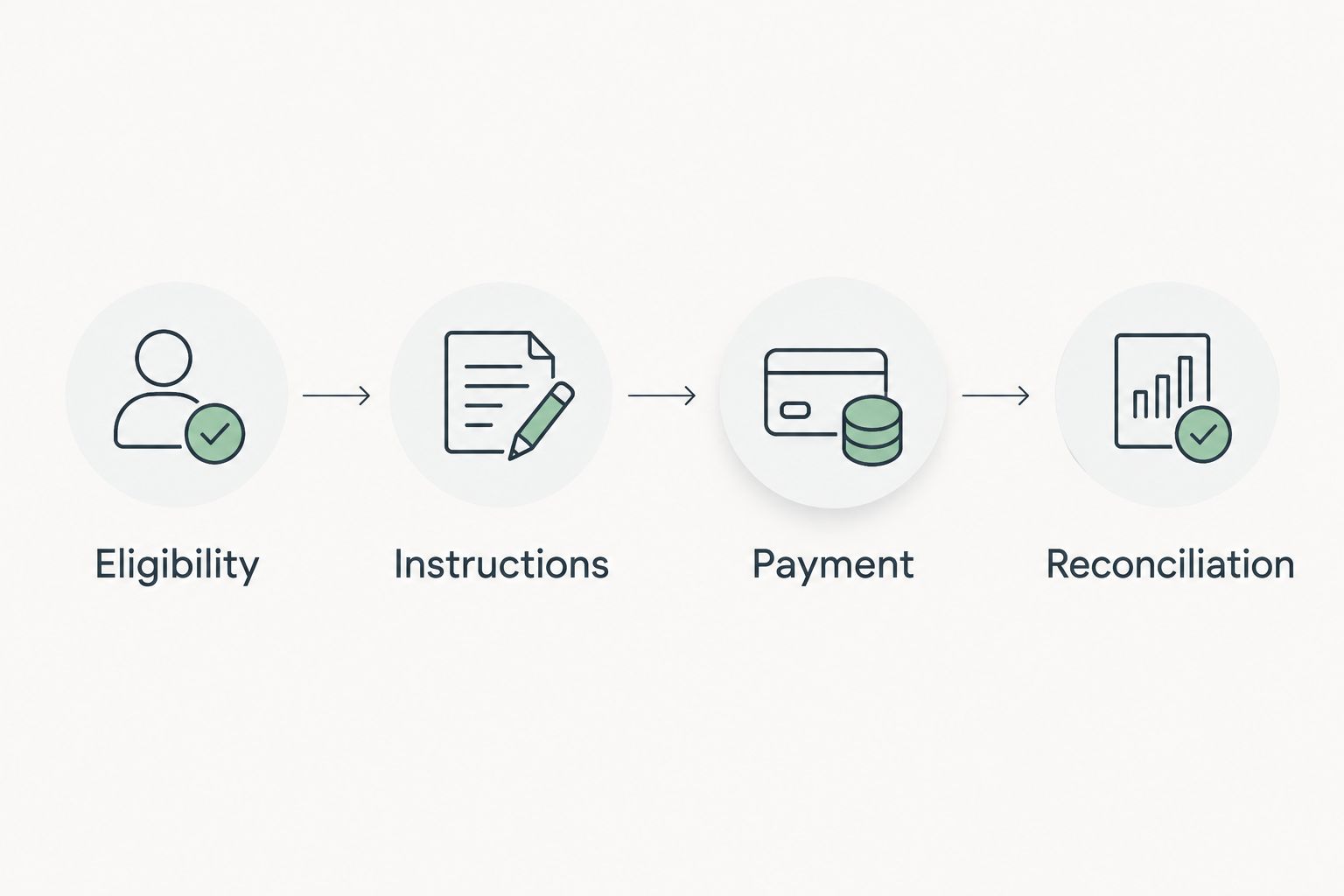
For Roxom bank funding, the decision rule is simple: use only an explicitly supported route, then verify the resulting credit. Never convert an unresolved transfer into an assumed trading balance.
Repeat a transfer without repeating old mistakes
A repeat cash-in workflow honestly differs from an initial setup: you can reuse your recordkeeping structure, but you still need to validate the payment instructions. Repeat the checks, not an old payment blindly.
| Workflow | Best for | Advantage | Limitation |
|---|---|---|---|
| First-time payment setup | Establishing a documented funding route | Creates a complete instruction and payment record | Requires careful entry and verification |
| Repeat payment review | Funding again after a completed transfer | Reuses your record format and comparison process | Saved beneficiary details still need rechecking |
For a repeat transfer in 2026:
- Retrieve the current account-specific funding instructions.
- Compare them with the saved beneficiary and previous payment reference.
- Update any changed details only after authenticating their source.
- Authorize the new payment and save its own transaction record.
- Reconcile the new credit independently of the previous transfer.
Do not schedule recurring bank payments unless the receiving instructions explicitly support that arrangement. A reference or route that works for an individual payment does not establish permission for unattended recurring funding.
Troubleshooting
Your account does not show bank-funding instructions
Stop before sending. Check account eligibility and ask through an authenticated support channel whether a bank route exists for your circumstances. Do not send funds to another user's beneficiary or treat a wallet address as an alternative bank destination.
The bank cannot accept the supplied details
Check that you selected the intended domestic or international route and entered the correct type of account identifier. If the form still rejects the details, ask the bank to clarify its required fields and confirm the receiving instructions separately; do not alter identifiers to pass validation.
The bank shows completion, but the destination shows no credit
Compare the payment's execution status, currency, beneficiary, and reference with the original instructions. Provide authenticated support with the transaction identifier and a suitably redacted receipt, and ask the sending bank about a trace when appropriate. Do not send a duplicate merely because the first payment remains unresolved.
You omitted or changed the payment reference
Keep the original receipt and report the exact reference actually sent. Ask the receiving support channel how to identify the payment; do not assume that editing a saved beneficiary changes an already authorized transfer.
The credited amount or currency differs
Compare the bank's executed-payment record with the destination credit, including any disclosed conversion or deductions. Request an explanation for the difference before marking the transfer reconciled. Preserve both records rather than overwriting the original amount.
Customize your workflow
Best for eligible non-U.S. bitcoin holders, Roxom is a bitcoin-native trading platform. Its stated range of trading, credit, and investment instruments provides context for deciding what you intend to fund; it does not make bank funding universal or remove the need to verify account-specific instructions.
The practical advantage of this workflow is traceability. Its limitation is that it depends on information and confirmations from your bank and destination account; your personal spreadsheet cannot establish that funds have arrived.
For your 2026 process, assign each transfer a status in your own log: prepared, sent, unresolved, or reconciled. Keep bank funding separate from later trades, collateral movements, and income records so you can identify what each transaction represents.
If portfolio recordkeeping is your next task, continue with the Google Sheets portfolio workflow. Treat tracking as a separate task from payment authorization.
FAQ
How do I make a bank transfer to Roxom?
First confirm that your account explicitly offers bank funding for your location and currency. Use its current receiving instructions, authorize the matching bank payment, and verify the destination credit separately.
Can a U.S. person use this platform?
No. The stated platform scope excludes U.S. persons, and using a bank account outside the U.S. does not override that exclusion.
What if my account only shows a cryptocurrency deposit address?
Do not use a cryptocurrency deposit address as a bank beneficiary. Confirm whether a bank-transfer route is offered before sending money.
Does my bank's confirmation mean my trading balance is ready?
No. A bank confirmation does not establish destination credit or a usable trading balance; check both in the receiving account.
Can I reuse a saved beneficiary for my next transfer?
Recheck saved beneficiary details against the current receiving instructions before every transfer. Confirm the currency and required payment reference as well.
What should I do if my bank transfer has not appeared?
Compare the executed payment with the receiving instructions and contact authenticated support with the transaction details. Ask the sending bank about tracing when appropriate, and avoid duplicating the unresolved payment.
Can I automate repeat cash-in payments?
Set up recurring payments only if the receiving instructions explicitly support them. A successful individual transfer does not establish that an unattended recurring arrangement is supported.
One last thing
A bank's saved-recipient nickname and the reference transmitted with a payment are different concepts. Before authorizing your next transfer, check the actual outgoing payment summary—not just the name you gave the beneficiary.